I like languages - but I hate to learn them.
Microsoft Research Translating Telephone
When I first saw this video back in 2010 I said to myself - hey! OCS 2007 R2 is a cool product, wonder when this will be released. Well, in our fast paced business I am still waiting for it.
Now at yesterday's Code Conference a new demo were shown
Skype Translator: Breaking down language barriers
Let's just hope they change the name to Lync / Skype Translator before release.
Have a nice day
Ha en bra dag
Miłego dnia
Heb een goede dag
좋은 하루 되세요
Wednesday, May 28, 2014

Saturday, May 24, 2014
Using IIS ARR as a Reverse Proxy for Lync Server 2013
There are several nice guides available on how to configure IIS ARR as a Reverse Proxy for Lync.

For example:
Using ARR for Reverse Proxy with Lync 2013
Using IIS ARR as a Reverse Proxy for Lync Server 2013
Installing and configuring IIS ARR Reverse Proxy
Using IIS Application Request Routing (ARR) as a TMG Replacement
All these guides will take you through the steps of installing ARR, creating a server farm and configuring caching, proxy, and routing rules for the farm.

When adding a server to the server farm you need to specify on which ports the reverse proxy should pass on the traffic to the internal side. In Lync we have internal webservices, to be used by internal clients using ports 80 and 443, and we also have external webservices (i.e. an IIS Web site) using ports 8080 and 4443. Hence, you should set these ports to 8080 and 4443, and also make sure your internal firewall allows this communication.
Now once this server is added there is actually nowhere in the IIS ARR user interface where you can go back and validate these port settings. So if you need to double-check what port numbers you used, you will actually have to open up the applicationHost.config file, found in C:\Windows\System32\inetsrv\config. At the end of this file you will find the <webfarms> settings and check what ports were configured.

For example:
Using ARR for Reverse Proxy with Lync 2013
Using IIS ARR as a Reverse Proxy for Lync Server 2013
Installing and configuring IIS ARR Reverse Proxy
Using IIS Application Request Routing (ARR) as a TMG Replacement
All these guides will take you through the steps of installing ARR, creating a server farm and configuring caching, proxy, and routing rules for the farm.
When adding a server to the server farm you need to specify on which ports the reverse proxy should pass on the traffic to the internal side. In Lync we have internal webservices, to be used by internal clients using ports 80 and 443, and we also have external webservices (i.e. an IIS Web site) using ports 8080 and 4443. Hence, you should set these ports to 8080 and 4443, and also make sure your internal firewall allows this communication.
Now once this server is added there is actually nowhere in the IIS ARR user interface where you can go back and validate these port settings. So if you need to double-check what port numbers you used, you will actually have to open up the applicationHost.config file, found in C:\Windows\System32\inetsrv\config. At the end of this file you will find the <webfarms> settings and check what ports were configured.
Tuesday, March 4, 2014
Profiles For Lync 2013 - Swedish edition

Swedish version of P4L
With Profiles for Lync you can preconfigure and store up to 40 Lync sites and credentials. Then with a click on a button logout and log back in to Lync with another set of credentials, and even into another system, including Lync Online.
I have been reporting about this great tool before here on the blog.
What is now new, is that you can download the tool with support for the following languages: Danish, American English, Parisian French, Italian, Bokmål Norwegian, Portuguese, Russian and Swedish. I got the chance to help out with the Swedish translation of the tool, quite interesting since a lot of the lingo in this business will be more of Swenglish than proper Swedish.
The tool will simply follow the language setting of your regional settings in the Windows control panel and display in the language of choice.
Download the tool from the Office gallery here.

Translated by yours truly
Thursday, February 27, 2014
The great Lync Conference of 2014

Lyncing like a swede!
So it was time again for the great Lync conference of 2014 or #Lyncconf14 as some of us called it. The conference were held in Las Vegas at the Aira - a Vegas sized hotel with some 4000 rooms and 15 restaurants. The number of conference attendees almost doubled from last year; around 1600 persons were here.
The main message from the keynote with Gurdeep Singh Pall (Corporate Vice President for Skype and Lync) was "The era of Universal Communications is here!" You can watch the keynote on demand here: http://www.lyncconf.com
Some of the major points and announcements were:
- Updates to Lync will happen faster in the future and new features will continue to be released in Cumulative Updates for Lync. Hence, do not forget to keep up with the updates for Lync.
- P2P Video with Skype will be coming sometime during the summer of 2014.
This will become available for existing Skype integrations.
- Video Interoperability Server - a "videoation server" sort of a mediation server for video is coming.This server role will make it possible for third party video endpoints to join Lync video meetings, the server could be installed on a separate server or collocated with a Lync front end. The server role is coming in the next version of Lync.
- Universal Communication Javascript API or UCJA (aka jLync) is a web based Lync API that could be used to create rich featured Lync clients for websites. This could be seen as "WebRTC for Lync" the feature will arrive in a coming Lync Server CU.
- Lync Mobile for Android on Tablets - Lync Mobile is currently only supported on phones when it comes to the Android OS.

With Pat Richard and Matt Landis

Nordic people: Martin, Tommy, Ståle ; Daniel, Mikael, Daniel, Daniel

Peter from CellIP, Silje from Dolphin and Johan from Cygate
If you would like to get hold of the sessions from #Lyncconf14 I can recommend you to use Tom Arbuthnot's excellent script found here.Monday, October 21, 2013
Swedish Spellcheck in Lync 2013
Since we now have spellcheck in Lync from version "CU2 September 2013"
(that is Lync 15.0.4535.1002 and MSO 15.0.4517.1504) the natural question arises:
How do I get Lync spellcheck in my mother tongue?
Well, to start with, make sure you have the minimum updates for the Lync client. If not, you can download them here: Lync 2013 update 15.0.4535.1510.
This is an updated update of the client "Cumulative Update 2" which will take the client to version Lync 15.0.4535.1507 / MSO 15.0.4517.1504. (Which is kind of weird considering the name of the update, but anyway...)
First install the updates for MSO (KB2727096), MSORES (KB2817624) and IDCRL (KB2817626) which basically are Office 2013 updates and finally install the actual Lync client update lyncloc2013 (KB2825630)
Lync 2013 is a part of Office 2013 and will use the spellcheck feature from Office so you need to find and download an Office 2013 Language Pack for your language. In my case I downloaded "Office 2013 Single Language Pack (x86 and x64) - DVD (Swedish)" and clicked through the setup.exe program.
Next you will find the Office 2013 Language Preferences tool in the start menu, and this is the tool you use to configure languages for Office 2013.


(that is Lync 15.0.4535.1002 and MSO 15.0.4517.1504) the natural question arises:
How do I get Lync spellcheck in my mother tongue?
Well, to start with, make sure you have the minimum updates for the Lync client. If not, you can download them here: Lync 2013 update 15.0.4535.1510.
This is an updated update of the client "Cumulative Update 2" which will take the client to version Lync 15.0.4535.1507 / MSO 15.0.4517.1504. (Which is kind of weird considering the name of the update, but anyway...)
First install the updates for MSO (KB2727096), MSORES (KB2817624) and IDCRL (KB2817626) which basically are Office 2013 updates and finally install the actual Lync client update lyncloc2013 (KB2825630)
Lync 2013 is a part of Office 2013 and will use the spellcheck feature from Office so you need to find and download an Office 2013 Language Pack for your language. In my case I downloaded "Office 2013 Single Language Pack (x86 and x64) - DVD (Swedish)" and clicked through the setup.exe program.
Next you will find the Office 2013 Language Preferences tool in the start menu, and this is the tool you use to configure languages for Office 2013.

Set the language you want to use in Lync 2013 spellcheck as the <default> language.
And look! It works!

Friday, July 26, 2013
Lync Storage Service (LYSS)
Lync Storage Service (LYSS) is a storage framework in Lync Server 2013 intended to be used by different Lync Storage Service consumers for accessing storage platforms in a Lync Server 2013 system. To support high availability, LYSS accepts and saves copies of the data on multiple Front End servers in the pool temporarily, and removes that data once it has been delivered to its final long-term storage location (SQL or Exchange). LYSS reports to the event viewer Lync log as "LS Storage Service" and it is possible to use the Lync Server 2013 Logging tool to log events from "Lyss". LYSS is using a database named lyss which resides in the lynclocal instance of the SQL Server express on the Front End server.

LYSS uses Windows Fabric for replication between the Front End servers in the pool. If data is deleted on a primary Front End Server, but the deletion on a secondary Front End Server fails, perhaps if there is an unexpected shutdown or error on the receiving Front End server data can be left behind and "orphaned." This orphaned data can cause performance to degrade and waste drive space. This condition will generate the events LYSS_DB_SPACE_USED_ERROR (Id=32058) and LYSS_DB_SPACE_USED_CRITICAL (Id=32059) in the event log on the Front End server in question. You could then check the performance counter on the Front End server under “LS:LYSS - Storage Service API” with the name "LYSS - Current number of Storage Service stale queue items." If this performance counter has a high value, for example greater than 50,000, then you should run the CleanuUpStorageServiceData.exe tool from the Lync Server 2013 Resource Kit which will delete all orphaned data from the pool.
Tuesday, July 16, 2013
Lync 2013 Cumulative Update 2
On July 1 Cumulative Update 2 for Lync 2013 became available from Microsoft. This is how I did an upgrade of my Enterprise pool sort of following the process outlined in KB2809243 and in the Technet article, Upgrade or Update Front End Servers
First I issued the command
Get-CsPoolUpgradeReadinessState
to see if all my front-ends reported True on the IsReadyForUpgrade parameter.
Then I used services.msc to stop all Lync services on my first front-end before running LyncServerUpdateInstaller.exe on this server, and when done I rebooted this server. Once the front-end service on my first front-end came back to a running state again after the reboot I switched over to front-end number 2, and did the same, and finally completed front-end number 3. It is important that the upgraded server comes to a running state again before moving on to the next one, this to maintain quorum of the pool.
Next I wanted to verify the versions of my databases with the command
Test-CsDatabase -ConfiguredDatabases -SqlServerFqdn sql.kressmark.com
Now some of the databases had different numbers for ExpectedVersion and InstalledVersion, so I issued the databse upgrade command
Install-CsDatabase -ConfiguredDatabases -SqlServerFqdn sql.kressmark.com -Verbose
and naturally I wanted to verify that all the expected and installed versions now matched. To do that I added the following to my original test command
Test-CsDatabase -ConfiguredDatabases -SqlServerFqdn sql.kressmark.com | Select DatabaseName, ExpectedVersion, InstalledVersion
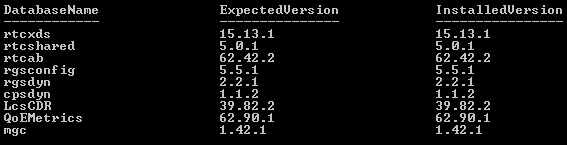
Next, I continued with my Edge Servers, Mediation servers and Persistent chat servers in that order, and finally I issued the command
Enable-CsTopology
Here is an overview of what database versions are expected with each version of Lync for all the databases - happy patching!
First I issued the command
Get-CsPoolUpgradeReadinessState
to see if all my front-ends reported True on the IsReadyForUpgrade parameter.
Then I used services.msc to stop all Lync services on my first front-end before running LyncServerUpdateInstaller.exe on this server, and when done I rebooted this server. Once the front-end service on my first front-end came back to a running state again after the reboot I switched over to front-end number 2, and did the same, and finally completed front-end number 3. It is important that the upgraded server comes to a running state again before moving on to the next one, this to maintain quorum of the pool.
Next I wanted to verify the versions of my databases with the command
Test-CsDatabase -ConfiguredDatabases -SqlServerFqdn sql.kressmark.com
Now some of the databases had different numbers for ExpectedVersion and InstalledVersion, so I issued the databse upgrade command
Install-CsDatabase -ConfiguredDatabases -SqlServerFqdn sql.kressmark.com -Verbose
and naturally I wanted to verify that all the expected and installed versions now matched. To do that I added the following to my original test command
Test-CsDatabase -ConfiguredDatabases -SqlServerFqdn sql.kressmark.com | Select DatabaseName, ExpectedVersion, InstalledVersion
This gave a somewhat easier-to-read output for comparing versions.
Next, I continued with my Edge Servers, Mediation servers and Persistent chat servers in that order, and finally I issued the command
Enable-CsTopology
Here is an overview of what database versions are expected with each version of Lync for all the databases - happy patching!
Subscribe to:
Posts (Atom)