Pages

Thursday, October 4, 2012

SUCK - Svenska UC Klubben - meeting 2012-10-04

Post in Swedish about a meeting in our local UC user group in Sweden.

På Torsdag den 4:e Oktober drog vi igång exakt 17:30 eller kanske 17:45 hos Uclarity på Brunnsgatan. Som mest var vi 18 personer på plats och 15 online. Uclarity ställde upp med lokal och dricka. Magnus / Mailmaster bjöd på mackor. Stort tack!


Live / på plats
Mattias Kressmark - Kressmark Unified Communications
Martin Lidholm - Uclarity
Tommy Clarke - UCaware
Mats Lundqvist - Videointresserad
Daniel Banfield - Cygate
Zvonimir Markic - Interoute
Stefan Petersson - Relevo
Håkan Andersson - Invid Globen
Johan Hallström - Aleste
Ove Bristrand - Netitegrate
Tomas Rönnberg - Uclarity
Per Sundqvist - Competella
Fredrik Blid - Uclarity
Martin Malm - Uclarity
Mårten Ekblad - Relevo
Fredrik Karlsson - CellIP
Magnus Björk - Mailmaster
Emelie Ekblad - Microsoft

Online via Lync möte
Jessica Augustsson - Atea
Jonas Fogelström - Atea
Henrik Börjesson - Atea
Joakim Forsström - Atea
Fredrik Björk - Logica
Johan Jisborg - Södra Skogsägarna
Johan Rydin -  Rydin Consulting
Marcela Vásquez  - Alfa Laval
Mattias Huber - Uclarity
Mattias Boss - Uclarity
Peter Möller - Atea
Lotta - Atea
Simon Walsh -Atea
Anders Green
Jonny F

Martin och Tommy börjar med att prata om nyheter i "Wave 15" Lync 2013 och Exchange 2013.
Relativt få i UC klubben har sett och testat Lync hittils.
Persistant chat (Group chat) ingen speciell klient behövs längre som i Lync 2010, demo på denna.
Det finns en ikon i klienten - "Chat Rooms" där man kan skapa nya rum via webbsida.
Det går att koppla en RSS feed till ett rum.
Historik spars i x (365 default) dagar.
Använder sin egen SQL databas.
Inställningar för "Persistant chat" finns i Lync kontrolpanelen.

Video!

HD 1080p peer-to-peer och konferans - Dyr (bra?) skärm behövs om man vill visa alla 5 feeds i HD.
Man skulle alltså kunna få varje ström i HD 1080p.
h.264-based - det är alltså en "dialekt" det kommer inte funka rakt över med andra system.
h.265 - inte i Lync 2013.
Face detection / smart framing - demo - Bandbreddsbesparande funktion
Måste upplevas - men i stort sett - rör man på skallen så följer kameran med.
När två pers kommer i bild så breddas bilden.
Går det att slå av denna funktion?
Lync 2013 Byter upplösning och bandbreddskrav snabbare än Lync 2010.
När video inte visas så visas istället din bild (bliden blir alltså viktigare i Lync 2013)
Sitting row - bilder på de som inte snackar.
Det går att poppa ut video och flytta det fönstret till en annan skärm, med bra kvalite.
URL baserade bilder försvinner, AD lagrade bilder behövs, eller bättre, Exchange kan lagra HD blider.

Lync Web App - är en MÖTES klient.

HTML5 baserad - plug in behövs (8MB) om man vill visa ljud och bild.
Samma plug in för Safari, Firefox, Chrome.
Ljud och bild kommer funka i Safari i Mac.
Safari kommer inte utvecklas på PC.
Lync attendee försvinner.
Video i PPT kommer fungera även i Lync möten.
Fullskärm fungerar i Webmöte.
Video preview finns också i webklienten.
Support för touch skärmar kommer finnas på något sätt.
Lägg till "?sl=1" i URL för att testa Web App om du har Lync klienten installerad.
(Vill man använda kontaktlista och chat så finns ju detta i OWA (Outlook Web App))

Det finns fler möjligheter att customisera mötesinbjudan, logo, footer, help, disclaimer.
Det går att schemalägga möten från OWA.

Virtual Desktop Infrastructure (VDI) Plug-in, en ljud/bild stack som körs lokalt på klienten.
Support för ljud och bild i Citrix / tunn klienter
Ljud / bild renderas lokalt.
VMware / Citrix / Microsoft etc måste lägga till support för denna plug-in, de har uttalat ambition att göra detta.

Server förbättringar
WAC server behövs för att dela PPTs i Lync möten.
Monitoring servern co-lokeras med front-end
Archiving kan användas mot Exchange 2013, eller SQL.
Data från Lync sparas i Exchange och man kan använda Sharepoint för att titta på denna data...
SQL Express finns alltid på all Lync server roller.
Director är inte rekommenderad längre, den är numera "Optional".
Speglade databaser
A/V MCU kan inte separeras från front-end längre.
Poolerna kan nu innehålla fler maskiner och det går även att spegla hela pooler.
Persistant chat är också en typ av pool.
SQL kluster är inte längre supportat, däremot speglad SQL.
Enklare att sätta upp och bygga om.
Lazywrite används i SQL, ger mindre last på SQL.

Vid användning av Backup site i Lync 2010 har man fått den begränsade klienten, i Lync 2013 bibehålls full funktionalitet.
XMPP stöd är med default, ingen separat server behövs.
Unified Contact Store - problemet med dubbla kontakter försvinner om man kör Lync och Exchange 2013.

Inga större förändringar i Response groups.
Det går att delegera rättigheter för response groups, typ telefonist kan ändra vissa inställningar.

Lync kan nu ta in samtal på en Trunk och skicka ut på en annan (transit PBX).
I Lync 2010 kunde man bara sätta trunk inställningar på Global / Site nivå, i Lync 2013 kan man sätta detta på Trunk nivå.

Hybrid Voice - Kör Lync från Office365, och voice från en lokal Lync installation.
O365 edge snackar med lokal edge, lokal mediation server bypassar all media lokalt.

GET / SET SIP verbs (som annonserades i Lync 2010 ignite) kommer nu med.
Detta kan användas för integrationer med mobilnät.

Stöd för IPv6 finns.
Hur skall man göra med Direct Access och Lync i 2013?
Media trafik mår alltid bäst via Edge.
Skype integration - support för presence, IM och ljud kommer efter Lync 2013 GA.
Vi hann inte med att snacka mobila klienter...

19:40 Break för mackor och mingel.

20:00 Magnus Björk pratade Exchange 2013, där arkitekturen ser ut att likna Exchange 5.5.
Konsumtionen av IOPS är betydligt mycket mindre.
"Every server is an island"
Public folders är förändrat.
MAPI är borta.
TMG försvinner, funkar realtivt väl med 2013, men begränsningar finns (logoff sidan syns inte.)
UAG funkar inte heller 100%, F5 / Apache kan vara alternativ.
Exchange UM och språkstöd diskuterades.

(Som ni märker så brinner inte antecknaren riktigt för Exchange på samma sätt som för Lync...)

Det blir en Lync konferans i San Diego i Februari 2013 kom dit!
Det blir en Sharepoint och Exchange konferans i Munchenbryggeriet i Stockholm
den 22-23 Oktober kom dit!
Magnus & Martin kör en Exchange och Lync 2013 Roadshow i Stockholm, Göteborg och Malmö i höst, kolla in!
När kommer då Lync 2013 och Exchange 2013?
Kolla LinkedIn gruppen för information om detta och om nästa SUCK möte...

Tuesday, October 2, 2012

Improvements in Lync 2013 (Preview)

It is nice to see a lot of little things being fixed here and there in the software we use daily.
Do you remember this fine dialog from the Lync 2010 client?
(Tools / Options / Personal / Advanced...)


It governs how the client tries to connect to the server. Way back in the days of Office Communications Server 2007 R2 it was possible to connect to the server using TCP rather than TLS. This option was removed in Lync 2010 when TLS became the one and only secure way to communicate server/client in Lync, but the setting remained even in Lync with this radio box of the connection type greyed out.

If you are really alert you will even notice it says "...server name or IP address:" and that was supported when using TCP, to use an IP address that is. In Lync 2010 this GUI is a bit misleading since an IP address can never be used when connecting with TLS.

Now in the Preview of Lync 2013 (version 15.0.4128.1019) the dialog window looks like this.


Much simpler, clearer and easier to use.


Mmm, delicious Toast!

I also like how the toast pops-up with photo as you have tagged someone, a simple improvement that makes the software more fun to work with.


In Lync 2010 when you hold down the Control key and right click the Lync tray icon, you will see the additional "Configuration Information" menu selection in the list. In Lync 2013 this is even easier to reach, you simply press the Control key once and the next time you right click the tray icon, the menu selection will be there. I do not know if this happens by chance or by design - but I like it!


Adding contacts is definitely a clearer task in Lync 2013 than before. The user will be much more aware about if they are adding an internal colleague or an external contact via federation.

There is also a video preview, like a mirror, straight in the chat window that one could use to check the tie and hair before starting a video call; could be important since people can see you even when you are not speaking using the new gallery view in a Lync 2013 video call.

There are of course many more good new and enhanced features in Lync 2013.

You can try the "Lync Client 2013 Preview" yourself as part of the "Office 365 ProPlus Preview". Lync 2013 can be connected to a Lync 2010 server and it is even possible to install the Lync 2013 client on the same computer as a Lync 2010 client and run them in parallel.

Happy testing!

Tuesday, September 11, 2012

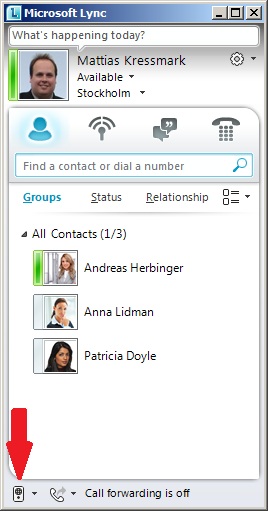
Where did the Audio Selection icon go?

Running the Microsoft Lync courses this is an interesting bug in the Lync client that always comes up for discussion. Even if we have several audio devices and we can select which one to use through Tools / Options / Audio Device, the little audio selection icon that should be in the bottom left corner of the main Lync screen will not show up.

This holds true even if the client is updated to Lync CU6 (version 4.0.7577.4103)


This is a known bug described in the following KB article:
The Audio Selection Button is missing in Lync
(Article ID: 2616187)

Unfortunately the article reports: "there is no date that is available for a resolution." So, as a workaround for this problem we must enable Enterprise Voice for the user of this client:

Set-CsUser -Identity mattias -EnterpriseVoiceEnabled $true

Then the user must sign out, wait, and sign back in to the client, it is not necessary to actually restart the client. Once back in the client the little icon (and also the dial pad icon and call forwarding information) is visible again.


Thursday, July 12, 2012

Lync Busylight

Finally received my Lync Busylight from Plenom!
It came in a small box containing the unit and a minimal sheet with instructions. "Use common sense" and "Do not immerse the product in any type of liquid" were the most interesting guidelines, but also there was a link to a driver download page.
On the driver download page you could register for software updates, there was a FAQ section, a quick guide and a datasheet; informative, simple and to the point.
The drivers are available in a version for all users of the computer which requires administrative rights to install, and a user version which installs the software locally under your user profile folder.
The installation was straightforward, but to many "nexts" I think: Next, I agree, Next, Next, Next, Next, Finish. Then the light started to shine in green. The light can show 5 colors: dark red (Do Not Disturb), red (Busy), yellow (Away/Off Work), green (Available) and blue flashing (Incoming call) but the difference between red and dark red is probably too small to be visible to anyone walking up to your desk. At an incoming call the light will play a ringtone and there are 8 different tones to choose from, and you can even set the volume of it. The driver installs a tray application where you can control the tone and volume.
So far I really like this little product and I think it can be really useful when sitting in an open office environment with a headset glued to your skull. The Microsoft Lync team tweeted about busylight with this post: "15% of employees cite distraction by colleagues as a drain on productivity" and pointed to busylight as a solution, I second that.
Thanks Plenom for a great product!

Tuesday, July 10, 2012

TechEDs 2012 - NA & EU

TechED 2012 in Orlando was the first TechED I attended, all-in-all a great event! Well organized, and really great to meet with all these people. Someone said that techED is about the people - the community - and I agree. 

The event started out with a keynote session, it was so-so, not that the speaker did not do a good job, but there was really not that much new to get excited about. Windows 8 and Server 2012 looks good, but since most people in attendance had already seen these products it was not too exciting to see the switching between metro style and old-school windows. A new Hypervisor and SQL server looks nice, delivering a million IOPS. Clearly Lync were not the focus of techED this year, but I was a bit disappointed that they hardly mentioned Lync in the keynotes. There were a couple of really good sessions on Lync and many good speakers present.

The place we were in was really good, ample space for everyone. There were a big exhibitors section were a lot of companies talked about their products and gave away t-shirts and stuff. From a Lync perspective it was nice to meet with Jabra, Plantronics, Snom, HP, NET Technologies and Audiocodes among many others. I was helping out in the Hands-on-labs area where we had around 500 workstations set up and some 140 different labs that the attendees could play around with. You can still try the labs here for some time.
Some were really comfortable in our little lab area

I also joined the "Twitter army" which was a bunch of people tweeting from the event and a jury gave away some stuff for different categories of tweets and twitters. I really enjoyed that and I think it was a good way to follow the event online even though I was there. (Follow me, @mkressmark)

We also did have a lot of fun at the event; there was a garden sized chess table in the games area which was nice. There were a delegate party at the convention center and another one at Universal studios, and there were numerous other side events, meetings and parties you could attend.

 The coolest giveaway of TechED 2012!

I have to thank Specops / Knowledge Factory for a great "Swedish" party, nice to meet a few of the approximately 150 swedes that came to TechED i North America. Unfortunately, I got to see two terrible soccer games from a pub in Orlando, first Sweden lost to Ukraine and then to England and were out of the Euro2012 :-( 

 Walking a dog at Universal studios

TechED in Amsterdam followed the agenda of TechED in Orlando pretty closely. The keynotes were pretty much the same, many of the sessions had other speakers but the material was mainly the same with a few good exceptions. We all know everything in America is big, and everything in Amsterdam were a bit smaller, smaller convention center, exhibitors area, hands on lab area, twitter army, people, etc. However, I think I met with even more good people in Amsterdam, plenty of Swedes and Europeans. The parties were also really nice. Microsoft arranged a soccer viewing at the Amsterdam Arena (video here), and Microsoft Sweden also arranged a soccer night were we saw Italy defeat Germany.  
 The boxing bots and hands-on-lab area in Amsterdam RAI

All in all I had a great June this year, and I will try to attend TechED in New Orleans next year, hope to meet you there!

Monday, May 14, 2012

Please send me the link...

Lync have a number of settings on how hypertext links are to be handled in the system. One of the reasons on why this must be configurable is security. An evil hacker could quite easily send SPAM (SPIM) instant messages linking to a webpage or an executable or a script doing some nasty stuff. The Lync administrator could decide to make all links in instant messages to be non-clickable i.e. not hypertext, prefixed with an underscore or gently remind their users about the risk before clicking on a link.

One of the functions of the Lync server is called URL Filter and you will find the GUI to configure the filter under, Lync Control Panel / IM and Presence / URL Filter.

Simply turning on the URL filter, leaving the hyperlink prefix (aka UrlFilterAction or Action) as the default "Do not filter", will prefix any link with an underscore so that the link is not active when received. If we set a message in the AllowMessage message box (as in the illustration above) a notification message will be inserted at the beginning of each instant message containing hyperlinks.


Instead of using the GUI, powershell could be used of course
Set-CsImFilterConfiguration -Identity Global -Enabled $true -Action Allow -AllowMessage "Warning, this message contain a hyperlink!"

We could also allow the link to be active, clickable, but still send a warning message in the instant message that carries the link.

Set-CsImFilterConfiguration -Identity Global -Enabled $true -Action Warn -WarnMessage "Warning! You might be clicking a link!"


We can see that link is clickable and the user is gently reminded that there might be a risk involved in clicking the link. Now if we would like to further escalate this reminder we could even turn off hypertext altogether in IM conversations. This we can do with a parameter in the Set-CsClientPolicy command - no GUI is available for this setting unfortunately.

Set-CsClientPolicy -EnableURL $false

When EnableURL is set to true, hyperlinks embedded in an instant message will be clickable which mean that users can click a link and their web browser will open to the specified location. When set to false, hyperlinks appear in instant messages as plain text, like below.


Now this will not block to user to a 100% from using this URL, even here the user could copy the link text and paste it into their web browser. To completely block links from even reaching the user via instant messaging we could use the "Block hyperlinks" action of the URL filer. This could be configured either in the Control Panel GUI or by the powershell command.

Set-CsImFilterConfiguration -Identity Global -Enabled $true -Action Block


From the Lync documentation:
Set-CsClientPolicy
Set-CsImFilterConfiguration

Wednesday, May 9, 2012

Techdays 2012 Örebro

Kom till Örebro på tisdagen för pre-conference.
Jag lyssnade på spåret OS Deployment med Mikael Nyström och Johan Arwidmark. En MS representant öppnade och berättade att Windows XP support snart är slut, 700 dagar, det blir väldigt dyrt med support efter det? Konstigt argument att kasta på sina kunder som det inledande direkt på morgonen, men man förstår ju att MS vill bort från Windows XP och sälja nytt nu. Micke sa att problemet är nog inte att ms-supporten försvinner, det är drivrutiner för ny hårdvara. Sen gick herrarna igenom os deployment under fem timmar, med break för lunch och kaffe. Intressant och bra framfört som vanligt.

På Onsdag var det keynote...
Fokus i år är Windows 8 som kommer när det är klart.
En konstnärlig inledning med en tvärflöjtsspelare och en Microsoft direktör som försökte dra några egna skämt lite för tidigt på förmiddagen drog igång eventet. Sedan kom Pingis, en trevlig kvinna med konstigt namn och kort kjol. Hon gjorde reklam för en management bok och kallade in en "panel". Panelen - en fjunig vd för någon reklambyrå svamlade. Han hade förstått hur man drar igång en blogg och det viktiga verkade vara att koreanska småtjejer då kan blogga om mode, att det finns någon bakom som utvecklar och tar hand om tekniken är väl bra, men det kan man väl outsourca lika gärna? Sorry alla ni tekniker på plats... En metrosexuell creative director som varit den unge vd's lärare pratade om "storverk", men ingen fattade nog riktigt vad det var för verk. Ola Ahlvarsson hade upptäckt appstore och var frälst, igen, och så hade han spelat angry birds. Det måste vara kul att arbeta i en organisation som faktiskt tjänar pengar. Joakim Jardenberg hade väl möjligen något där på scenen att göra, han hade gett smartphones till några vd's så att de kan kolla golfresultat, jag hade svårt att se storheten i det. Efter en halvtimme hade större delen av geeks'en på plats somnat, men sen kom i alla fall något som vi var intresserade av, Windows 8!

Pieter Uittenbogaard demade Windows 8 och metro interface, bra genomgång! Lite zzz att han visade och förklarade hur musen fungerar i win 8. (Vi förstår redan att Win8 funkar med mus och keyboard.) Hoppandet mellan metro-style och gamla Windows looken (desktop läge) känns inte helt fräsch, men det kan kanske vara en bra förening av två världar. David Trupkin demade windows to-go. Windows på USB sticka - som backtrack! Snyggt! Krypterat med bitlocker och man kan slita ut stickan och sätta in den igen efter 60 sec och Windows bara pausar och går igång igen. Automatic repair kan laga trasiga eller infekterade systemfiler automatiskt innan Windows startar. Metro och touch funkar i remote desktop. Video över WAN funkar bättre med Win8 VDI. Danwei Tran höll i Geek award 2021 och Simon Jäger - en ung fjunig geek - vann det hela, skön kille! Sedan var det breakout sessioner, jag gick på något under alla pass men antecknade bara på de mer intressanta sessionerna.

 
Windows 8 overview - Johan Berglin och Nicklas Schwarz
Den 8 april 2012 - inget mer Windows update för Windows XP. Sen blev det demo resten av tiden och vi fick se följande:

Nästa möte från kalendern syns på startskärmen.
Metro-style Live tiles visar lite mer info när man loggat in med pin, lösenord eller bild.
Windows store innehåller redan 100 applikationer idag, och de är gratis!
De applikationer som fungerar i win7 fungerar i win8.
Ja, vi vet att man kan använda mus och keyboard i win8.

Datorn kan vara domänjoinad och ansluten till Windows live samtidigt.
Det går att synka inställningar med molnet.
Recimg skapar install.wim fil, som en snapshot ungefär.
Det går att zooma on-screen tangentbordet så att det passar min egen tumstorlek.
Det går att skriva med penna.
Alt-tab är kvar. Win + x plockar upp "startmeny".
Bara signerade apps kan köras i metro.
Applocker kan hindra applikationer att köras.
Demo av Windows NT 3.51 inne i Win8 hyper-v, skönt geekigt!
Multitouch över remote desktop.
Enkel flytt av virtuella maskiner.
3D video adapter i virtuell maskin, läggs enkelt till med powershell.
Secure boot signerar startfiler i windows.
Demade USB kanon kopplad till klient och styrd via remote desktop.
Bra jobbat av både Johan och Nicklas - informativt och underhållande!


Telefoni med Lync på den nordiska marknaden - Martin Lidholm
Telefoni används på olika sätt i olika delar av värden. Hur passar det amerikanska Lync systemet in i norden?
Norden är annorlunda p.g.a. följande unikum: Hög mobilpenetration, hänvisning, telefonister, vi gillar inte röstbrevlådor, mobila anknytningar. Lync är annorlunda, därför blir det missvisande att jämföra feature för feature som många vill.

Ingen upptagetton - men är det så bra med upptagetton egentligen? Man kan vara inloggad på många enheter / klienter samtidigt.
Demo av att ringa med Lync.
Sätt att koppla Lync mot PSTN:
- Lokal VoIP Gateway
- SIP Trunk från operatör
- Direct SIP mot egen IP-PBX

Certifierade SIP trunkar.
Cellip är inte certade ännu, men de är snabba och det funkar bra.
Med mobilen blir man sin egen telefonist till viss del.
Med federation ser man presence även utanför organisationen.
Demo av simultanringning och utgående samtal med mobilklient (call-via-work.)
Olika implementationsscenarion visades.
Nätcentrisk dubbelringning - Telenors norska lösning. Nätsidan funkar även om Lync går ner, och lync sidan om mobilnätet går ner.
Competella's MDA for Lync.
Mobil linjestatus - Lync kan visa statusen "upptagen på mobil" - TDC kan leverera detta idag.

Myter kring telefoni i Lync
Egna standards: Nja, Lync kör egna codecs - men har även g. 711.
Ingen telefonist eller contactcenter - Jo, tredjepartare finns.
Saknas stöd för analoga enheter - Jo, fungerar med ATA box.
Saknas stöd för DECT - Jo, Polycom stödjer Lync.
Saknas stöd för least cost routing. Martin försöker förklara LCR i Lyncmiljö, men tyvärr är denna myt inte bustad ännu tycker jag.
Ingen mobilkoppling - nja, det finns ju presence, im och callback klient nu.
Ingen busytone - Jo, via busy-on-busy och liknande applikationer.

Martin är alltid en klippa på scen, presenterar lugnt och sakligt och kan sina saker - grymt!

Sen lyssnade jag på John Craddock som pratade ADFS - intressant session!

Overall var det ett bra event som tidigare, tack Microsoft! Tyvärr var det för lite Lync snack för någon som är så nischad som jag och jag gillade inte riktigt de externa talarna som pratade om annat än produkterna och tekniken.

Sen blev det ju också bra partaj när Rydell & Quick spelade...