Pages

Tuesday, September 13, 2011

Federation is fun!

After building a short list of Swedish organizations using Lync federation, I got in contact with Julian Bee from New Zealand. Quite funny that Lync federation would put me in contact with a guy from the other side of the world. Anyhow, Juilan managed to start what I had in mind much quicker than I, he now maintains a site called "Lync federation Directory" with the easy-to-remember URL of:

I will still maintain my list of Swedish organizations or organizations with business in Sweden, at this page: Svenska Lyncfederationslistan

It is cool to consider how this in the long run could create something like a PSTN for Lync clients. So this is what Mr. Bell and Mr. Ericsson must have felt like when their equipment started to spread around. Now this network has presence and video besides voice so it will be even nicer.

And now, for all you who have not done so yet...
I know you want to click this...

Friday, September 9, 2011

Lync social & Lync for Mac

Learnt about two cool new updates for Lync today...

The first is Lync social

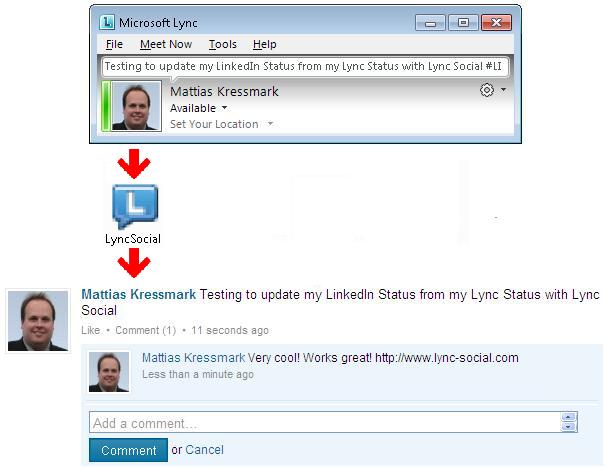
Lync Social is the a free little application for Microsoft Lync that allows users to update their Lync, Twitter and LinkedIn statuses simultaneously. Looks something like this:


The other update is Lync for Mac

Lync for Mac 2011 offers Mac users integrated functionality for presence, instant messaging, conferencing and voice. Now Mac uses can set up Lync conferences from Outlook 2011 for Mac and use enterprise voice features.

Wednesday, September 7, 2011

Svenska Lync Federationslistan September 2011

Microsoft Lync har en fantastisk möjlighet till federering. Se närvaro, ring, ring med video, skicka filer och dela applikationer över företagsgränserna! Organisationer som federerar måste ha en Lync Edge server och DNS posten ”_sipfederationtls._tcp.domain.com” registrerad i det publika DNS systemet. Det går även att styra vilka andra organisationer man vill federera med, men - information wants to be free – så öppna upp!

Hör av er till mig om ni vill vara med på listan, eller om jag skall plocka bort er, eller ändra någon uppgift. (mattias@kressmark.com)

Tuesday, September 6, 2011

More Lync related Visio icons

Some more  Lync related Visio icons has been posted on a Swiss Microsoft page.

It is icons from Aastra, Polycom and Radvision and it is great to finally find MX-ONE and Aastra 6725ip as visio icons!


Click this link for a zip file containing all icons.

See also this post for other visio icons:
http://kressmark.blogspot.com/2011/02/lync-2010-visio-icons.html

Friday, September 2, 2011

When I am busy I am busy and do not disturb me!

Lync handle the concept of busy differently than many traditional IP-PBX systems. Is it better or not? I do not personally know and I guess that it largely is a matter of taste and personal preference.

When busy in a call in Lync you could still get notifications popping up as a toast on your computer screen, not to intrusive and could easily be handled by most users. But if you also have parallel ringing configured to your cell phone it would also start to ring while you’re in a call, not to nice...

Another scenario where the Lync version of busy might fall short would be in a PBX integrated environment and where you have a serial call list, e.g. call first my PBX phone and then my Lync client and if I do not answer send the caller to my voice mail box. Now if Lync did not hand back a busy tone to the PBX you could end up in a scenario where you are busy on the phone in Lync, another important customer calls and he will not even reach your voicemail box. Hmm...

So we can see that in some environments there is a need for Lync to adapt to an old-fashioned way of handling busy.

Enter the Busy-on-busy software from the good people at Unify Square.

I have tested this little piece of software and it works like a charm! It is easy to install and it is easy to configure the system user-by-user as to if they are going to have busy-on-busy or not.

To install, you simply run a setup.msi on all the Lync front-ends, and the register the software:

C:\Program Files\Unify Square BusyOnBusy>BusyOnBusy.exe /register

Copyright © Unify Square 2011

Registering the BusyOnBusy Server Application.....
Successfully registered the BusyOnBusy server application

Then you simply use the .exe file with a sip address to configure which users that should get a busy tone.

C:\Program Files\Unify Square BusyOnBusy>BusyOnBusy.exe /multiplecalls:block /sipuri:mattias@kressmark.com

Copyright © Unify Square 2011

Certificate SerialNumber is: 62C85547000000000005
Configuring SipUri: mattias@kressmark.com, Multiplecalls: block
Configuration for mattias@kressmark.com was modified.


Looking at the illustration above we can discuss three scenarios which will be different if the user "Mattias Kressmark" have busy-on-busy turned on.

1. An external call to a PBX-homed DID number which is configured with a serial call list. In this case the incoming call would ring the PBX phone for x number of seconds, move on to the Lync "extension", then get a busy tone by the busy-on-busy tool, and then go to the voicemail system connected to the PBX.

2. An external call comes in and Mattias Kressmark is not answering anywhere, then the caller would end up in the voicemail box. (Yes, I do know about Exchange UM but just because we have two call managers we do not want two voicemail systems as well.)

3. An internal user - Isabella - calls Mattias who is in another call and she will then see the following message in the Lync client:

Monday, August 15, 2011

Localization bug in the Lync Client

Lync version 4.0.7577.314 thinks that it is Lync Attendee when switching from Swedish to any other language. This bug seems to only be in the Swedish localized version. I think most users should be able to live with this flaw, but it is always fun to find bugs
(I do have a past as a software tester...)

Wednesday, August 10, 2011

Won’t you call my private number?

...we can go away for the summer.
We can drive around with the top down.
Stereo turned up loud with a fat sound. :-)

With Lync it is possible to configure a private number - an additional telephone number which you can hand out to your closest friends. A call to a private number will bypass call forwarding (i.e. not be forwarded), and "Do not disturb" status. If the receiving user have configured simultaneous calling the secondary number will ring, probably because of Lync assuming that the secondary number belongs to the receiving user. It is not possible to set a status such as "Do not disturb" on the private line, it is always "open". It is possible to select a different ringtone for calls coming in on the private line, this is done in Tools / Options / Ringtones and Sounds in the client. A call to a private number will also generate an additional line in the call toast stating "Private Call" as seen in the picture. 

Some limitations of the private line is that it will work only for inbound calls, a user cannot use the private line to make an outbound call.  Voicemails recorded on the private line will be sent to the same Exchange UM mailbox as the users LineURI. Private telephone lines are available in Lync on-premise only, not in Lync with Office 365, also mixed environments with Lync and OCS 2007 will not work to a 100%.

Unfortunately there is no way of seeing a private number in the Lync Control Panel so Powershell must be used:

Get-CsUser mk@kressmark.com | Format-Table -Property DisplayName, LineURI, PrivateLine -AutoSize

DisplayName       LineURI          PrivateLine
-----------       -------          -----------
Mattias Kressmark tel:+46736405540 tel:+46736405541

This will show if a user has a private number configured or not.
To set a private number use the following command:

Set-CsUser mk@kressmark.com  –PrivateLine “tel:+46736405541”

From the Lync documentation: