Pages

Thursday, November 7, 2019

Ignite 2019 - THR2078 - Embrace your Microsoft Teams champions and arm them with these five power tools

Presented by: Mårten Hellebro

Session summary:
Come on, let’s find your Teams champions, embrace them and give them what they need so they can level-up and help you deliver a successful Teams implementation project with high adoption and happy users. So, how do you find the right users and what exactly do they need? In this session, MVP Marten Hellebro shares his real-world experiences working with Teams champions. Come to this session and get your Teams toolbox filled.

My Notes:

700 people signed up to this session - not all of the showed up.

User adoption is key to a successful Teams rollout. There is a difference between early adopters and ambassadors, ambassadors want to share knowledge with others. An ambassador can become a champion. A champion can be recruited by simply asking for candidates or look in the usage reports in the Teams admin center and you will find who is using Teams the most. Do not use IT people!

Five tools to give to your Champions

  1. Keep your champions in the loop (involved = motivated)
    https://aka.ms/O365Champions
  2. Special training
    Coffe in the cloud
    Teams Adoption Flipbook - https://aka.ms/TeamsToolkit
    Microsoft 365 Learning pathways
    End User Training - https://aka.ms/TeamsLiveTraining
    IT Pro Training - Microsoft Service Adoption Specialist
    https://aka.ms/AdoptionCert
    IT Pro Training - Enabling Teamwork with Microsoft Teams
    https://aka.ms/edx-cld267x-about
  3. Numbers talk - track the usage of Teams and inform the Champions.
  4. Well equipped - give your Champions the right devices and let them test different types of devices. https://aka.ms/TeamsDevices
  5. Swag - free promotional items / stylish confidence
    (I think this was when Mårten danced a bit and showed examples of swag - it was not recorded - someone please send me a recording!)

Give shameless recognition to your Teams Champions! 

Ignite 2019 - TMS30 - Designing your path from Skype for Business to Teams: Start Here!


Presented by: Bindu Pillai, Debbie Arbeeny

Session summary:
Are you a Skype for Business customer starting your transition to Teams? Understand how adopting Teams expands opportunities for your organization to communicate and collaborate effectively and efficiently. Learn about the Skype for Business to Teams upgrade experience, best practices and resources for a successful upgrade.

My Notes:

 
This presentation is part of a 3-session series
TMS30, BRK3232, BRK3217


Takeaways
  • How Teams can benefit your organization
  • The framework for a successful transition
  • Best practices and guidance

Skype for Business Online will be retired on July 31, 2021.

A video about how Tesco moved to Teams in six months were shown.

Teams is both a people change and a technology change

Shadow IT is something that needs to be handled. No one will go out to get their own operating system or their own email system, but for communications they will. This will create a disparate communications environment in the organization.


Start with creating a strategic plan

Support available


Key points to remember


QnA

How do we replace the Lync Attendant client?
Use a third-party solution.

Is there integration between Skype for business on-premises and Teams?
Yes.

What technical issues did Tesco face in the transition?
Some issues with understanding the modes at first, changing back and forth testing. Many users started doing video quicker than expected, QoS was implemented and bandwidth increased.

Ignite 2019 - BRK3215 - Microsoft Teams architecture update

Presented by: Bill Bliss

Session summary:
Join us for a deep dive into the architecture of the Teams clients and the microservices it talks to: who does what, how and where data is stored, and how it's kept secure and compliant. Learn about our investments to improve performance, reduce memory use and network bandwidth, deliver rich new "One Microsoft" features, and how we're re-writing our clients on a new platform while still releasing every week. Learn how Teams will support VDI, and about the latest enhancements to the scalable microservices that power Teams.

My Notes:

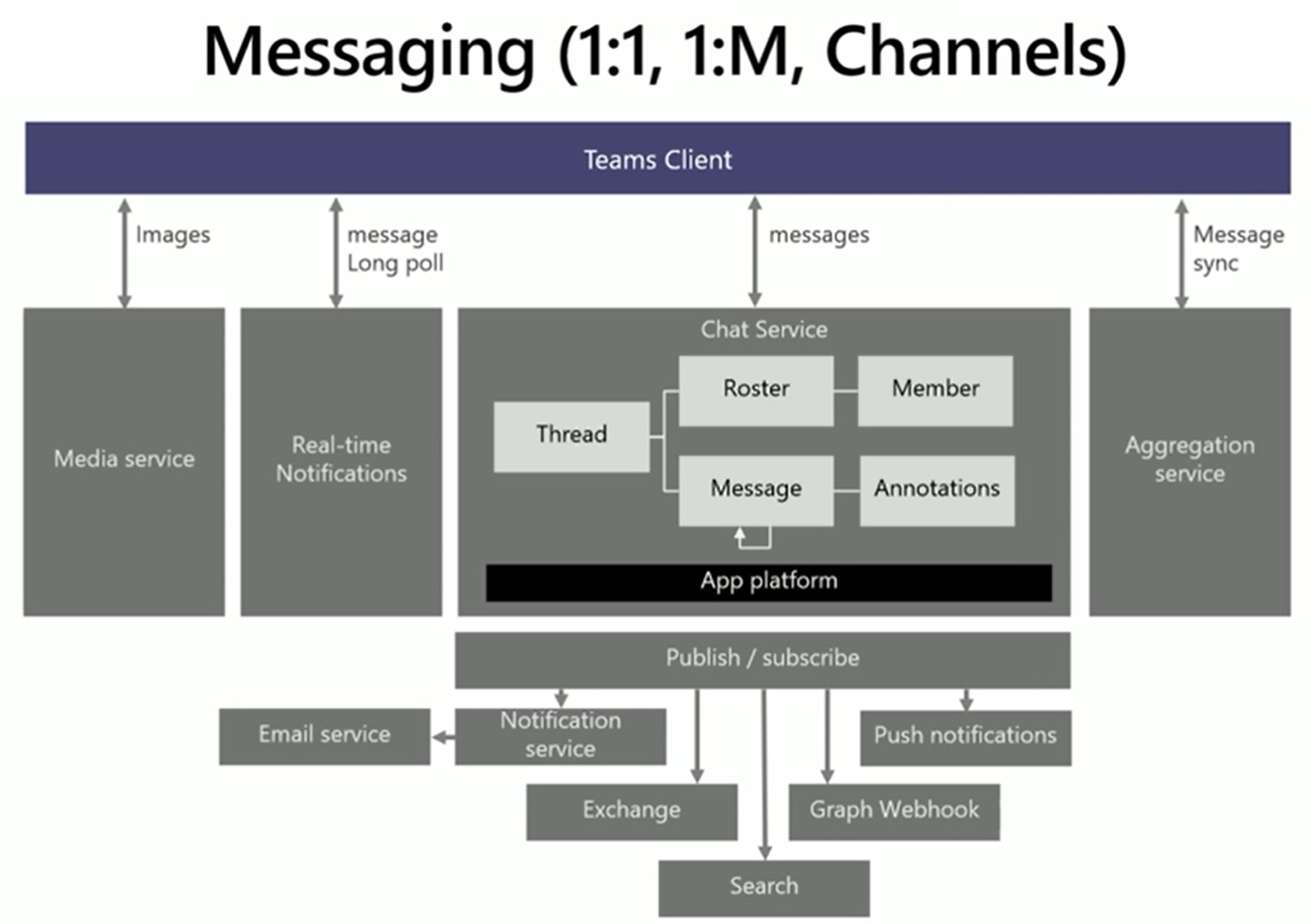
Started with a run-through of the main architecture, client architecture, micro-services (middle-tier, intelligent communications cloud (formerly known as Skype services), Teams as a part of Office 365, Azure Services and data residency.

Data at rest in Teams is stored in the region where the tenant is provisioned.
Work on the search feature in Teams is ongoing.
Graph API is logically just an additional Teams client.


Message handling was discussed in detail.


Where everything is stored was discussed in detail.


Since Exchange can be Online or on-premises a Calendar middle tier is used.


The presentation continued with Presence Interop, Meeting recording realized by a recorder bot, Calling.

Teams on VDI (vmware / citrix)
WebRTC is used to "remote" audio and video in a VDI environment.
The VDI client is installed using msiexec:
msiexec /i Teams_windows_x64.msi /l*v msi_install_x64.log ALLUSER=1
Not all features are supported in VDI scenarios (App sharing, background blur, QoS metrics)


Mirroring is used for A/V in VDI


Finally came Compliance and Information Protection

Resources:


Some QnA followed
  • Changing the name of a Team will break some things.
  • Teams contacts are stored in Exchange the same way as Outlook contacts.
  • Multiple Tenants capabilities?
  • Single sign on for tabs is coming in preview soon, and for bots are coming later.
  • The Teams client is a memory hog - this is being worked on.
  • How are vulnerabilities handled in the low-level open source components the client is using? They will be fixed in a coming release (Teams is released every week.)
  • When an Email is sent into a channel Teams writes to SharePoint and not to the Group mailbox due to extracting of attachments.
  • Rich text in federation scenarios is currently rolling out.
  • Can we block users from recording a meeting? No.